Loading
Loading
Loading
In this guide, we explain how you can change the default deadline for deleting personal data from your events.
You can apply the changes to a single event or several events simultaneously. You can also apply changes to both future and past events at once.
EasySignup has applied a list of default deadlines for deleting personal data from your events:
If you need another deadline for deleting personal data than the default settings, you can do this manually.
Go to the List of events and check the event or events you wish to apply another deadline for deleting personal data.
You can choose both past and future events simultaneously.
In the menu choose Action to perform on selected events, and apply Change the personal data retention periods.
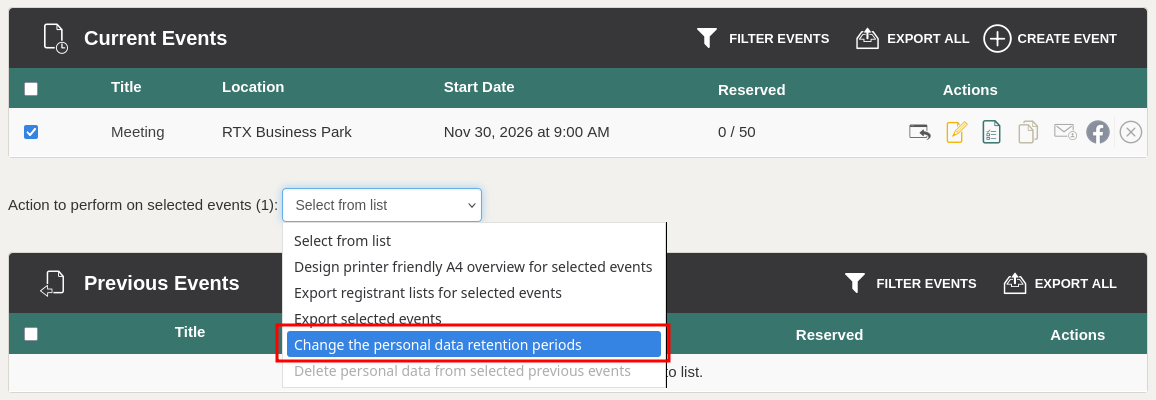
Make needed changes at (1) data regarding payment, and (2) other data.
Make sure (3) to approve the changes in the terms of registration, and (4) preview the changed terms of registration for the checked events.
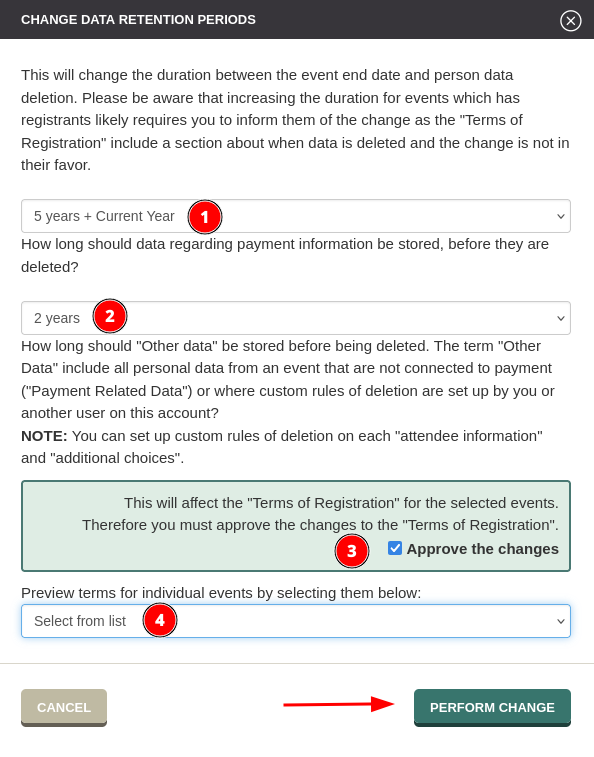
Remember to save your changes.
Now, you have set up new deadline for deleting personal data from your checked events.
If you wish to apply another deadline for deleting personal data than the default settings for all events created in the future, find a guide here.
If your changes to the deadline for deleting personal data mean that the deletion process is less than 3 weeks away, you must notice that it takes up to 3 weeks before personal data are deleted. It is due to the internal deletion procedure at EasySignup which takes up to 3 weeks.
Example:
5 days before your event, you decide that personal data shall be deleted 2 days after your event. The deletion process will be completed after up to 2 weeks after the event.
If you need the personal data to be deleted immediately, you can do this manually. We explain how to do this in these guides: several events and single event.
We've made a series of videos showing you how to use EasySignup.
Watch introductory videosWhether you are a participant or an organizer, some of the questions you might have about the IT-system are answered here.
Read the answers
Mette Jellesen and Jacob Thomsen
Support and Communication