Loading
Loading
Loading
Once you have published an event, it cannot be unpublished.
However, you can make sure that the event is not visible on your public list of events on EasySignup.
If you would like to see your public list of events on EasySignup, go to the top brown menu bar and click "VIEW SITE".

Below you will find a step-by-step guide to check and edit your event's visibility:
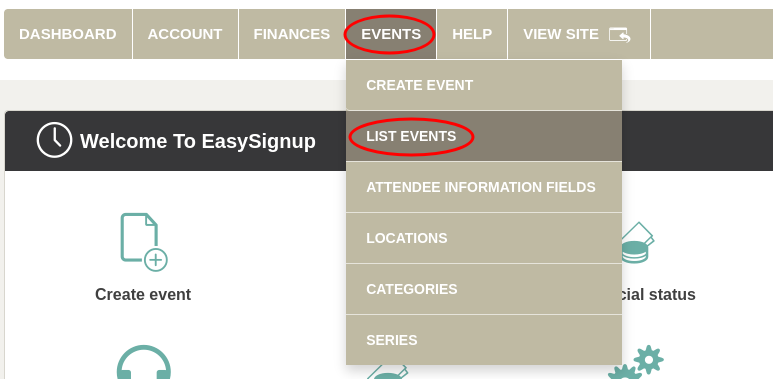
Go to "EVENTS" in the top brown menu bar and click on "LIST EVENTS".
Click the yellow pencil icon to the right of your event to edit your event.

Click "Visibility" in the menu bar.

Check if it says "NO" next to the text "Show the event on event lists".
If it says "YES", select "NO".

After that, click "SAVE AND STAY ON THE PAGE" at the bottom right corner.
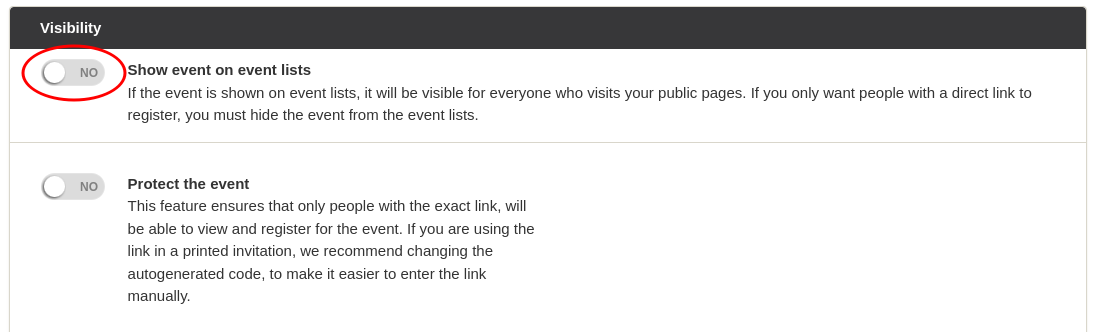

The event is now hidden, and attendees must therefore have the link directly to the registration page until you choose to make the event visible again.
If you want to share the event with, for example, a colleague before you make the event visible, you can find the registration page link on the event's status page.
See how to find the link here.
We've made a series of videos showing you how to use EasySignup.
Watch introductory videosWhether you are a participant or an organizer, some of the questions you might have about the IT-system are answered here.
Read the answers
Mette Jellesen and Jacob Thomsen
Support and Communication